How to Set Up a Comfortable Work-from-Home Desk in a Small Space
No spare room? You can still build a comfortable work-from-home corner. Practical tips on chair height, screen position, lighting and storage for small Indian flats.
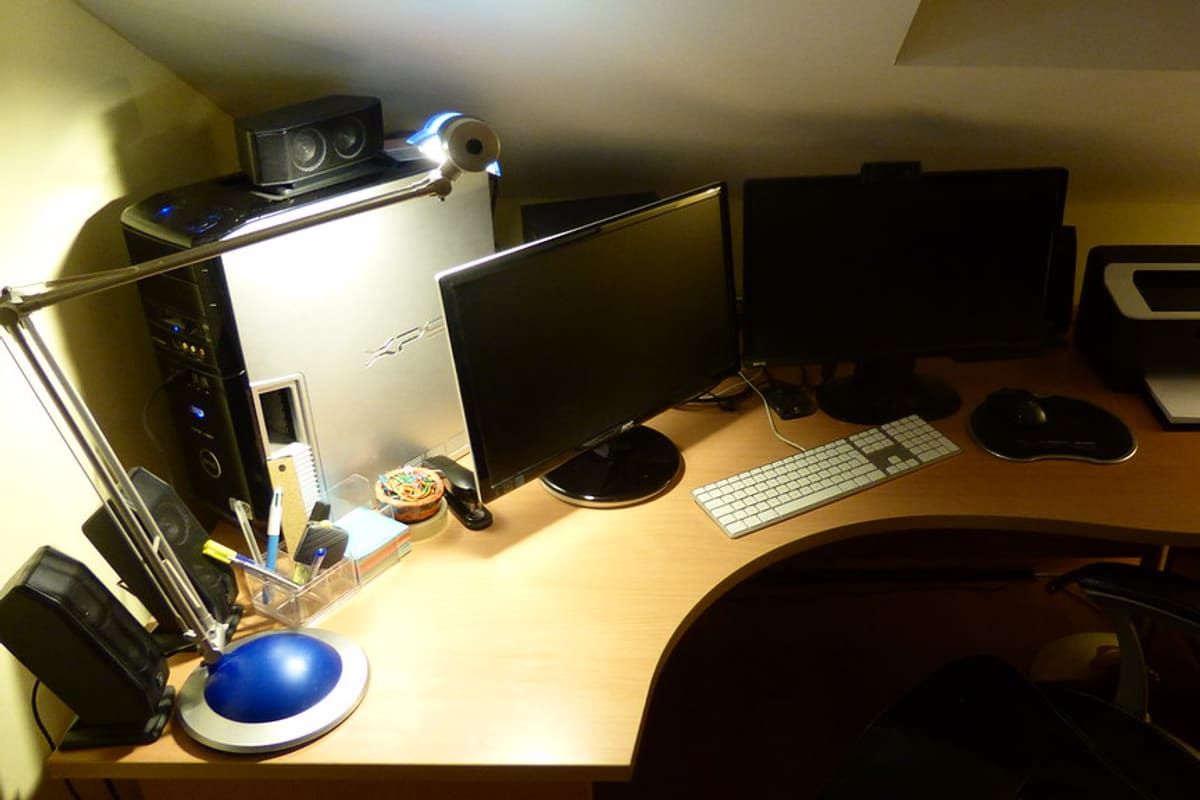
Home Office. Photo: Sean MacEntee via Flickr, CC BY 2.0.
Plenty of people have spent months, or years, working from a dining table, a bed or a plastic stool on the balcony. It works for a day. Over weeks, it tends to show up as a stiff neck, sore wrists and a feeling that work never quite ends. You do not need a separate study to fix this. A corner of a bedroom or living room, set up with some care, can be a genuinely comfortable place to work.
Choosing the spot
The best spot is usually a compromise between light, quiet and space. Look for:
- A place near a window, with daylight coming from the side rather than directly behind your screen or behind you.
- Somewhere you can leave your things set up, so you are not packing and unpacking every day.
- Distance from the television and the kitchen, if possible, to limit noise and interruptions.
- A nearby power socket, so cables do not run across walkways.
In a one-bedroom flat, the corner of the bedroom is often the only option. That is fine, but try to face away from the bed while you work. It helps the brain separate work from rest.
The desk itself
A desk does not need to be large. A surface about 90 to 100 centimetres wide and 50 to 60 centimetres deep is enough for a laptop, a notebook and a cup of tea. Wall-mounted folding desks and narrow console tables work well in tight rooms, and a local carpenter can often make one to fit an awkward alcove for a reasonable price.
Height matters more than size. Most standard desks are around 72 to 76 centimetres high. When you sit with your shoulders relaxed and your elbows bent at roughly a right angle, your forearms should rest on the desk without your shoulders rising. If the desk is too high, raise the chair and put a footrest under your feet. If it is too low, small wooden blocks under the legs can lift it.
A chair that supports you
If you spend money on one thing, spend it on the chair. A dining chair is rarely comfortable for eight hours. Whatever you use, aim for this position:
- Feet flat on the floor or on a footrest, with knees at about hip level.
- Your lower back supported. A small cushion or a rolled towel behind the waist does the job on a basic chair.
- Space for your hips at the back of the seat, rather than perching on the front edge.
- Armrests, if present, low enough that your shoulders stay relaxed.
Working from the bed or sofa is tempting, but the soft surface lets your back slump and your neck bend forward for hours. Save it for the occasional short call.
Get the screen to eye level
Laptops are the main cause of work-from-home neck pain, because the screen and keyboard are joined. To see the screen, you look down; to type comfortably, your hands need the laptop low. The fix is to separate the two.
- Raise the laptop so the top of the screen is at or just below eye level. A laptop stand works, but a stack of sturdy books does too.
- Use a separate keyboard and mouse at desk height. Basic wired ones are inexpensive.
- Keep the screen about an arm's length away.
- If you use an external monitor, place it directly in front of you, not off to one side.
Lighting and glare
Daylight is ideal, but avoid having a bright window directly behind the screen, which makes your eyes strain against the contrast, or directly behind you, which causes glare on the screen. For evenings, a desk lamp with a warm white bulb placed to the side of your writing hand is easier on the eyes than a single overhead tube light. Bump up your screen brightness in daytime and lower it at night to match the room.
Keep it tidy in a small space
A small desk becomes cluttered quickly, and clutter makes the space feel smaller still.
- Use the wall: a shelf or pegboard above the desk holds notebooks, chargers and stationery.
- Bundle cables with a simple tie or clip and run them along the leg of the desk.
- Keep one small tray or box for loose items like pens, earphones and sticky notes.
- Clear the desk at the end of each workday. Closing the laptop and putting it on the shelf is a small signal that work is done.
Look after your body through the day
Even the best setup cannot make sitting still for hours healthy. Stand up at least once an hour, walk to the kitchen for water, look out of the window at something far away for a few seconds to rest your eyes, and roll your shoulders. Taking calls standing up is an easy way to add movement. If neck, back or wrist pain continues despite a better setup, it is worth seeing a doctor or physiotherapist rather than living with it.
When the corner starts to feel like an office
The goal is a spot you can sit down at without thinking, work in comfortably and walk away from at the end of the day. Get the chair and screen height right first, sort the light next and add storage as you go. Small adjustments made early save a lot of aches later.